Expert guides, design inspirations, and technology innovations for luxury bathroom solutions.
Understanding auto-flush technology, heating controls, and ceramic durability.
Precision temperature management & wall-mounted brass fixture trends.
Multifunction digital integrated sinks redefining luxury home utility.
A Digital Display Integrated Waterfall Kitchen Sink can turn everyday washing into a more controlled, tactile experience. A clear temperature reading helps you adjust the water before rinsing delicate produce or filling a pot. The waterfall outlet spreads water in a broad sheet, while a pull-down sprayer can handle corners the main stream misses. Small details matter. Look closely at the display in bright kitchen light, feel the control response with wet hands, and check whether the sink bowl fits your largest pan. A striking fixture still needs to work on a busy Tuesday.
This guide shares five practical tips for choosing and using a Digital Display Integrated Waterfall Kitchen Sink, from checking display visibility to planning drainage and cleaning. One detail deserves careful attention: digital features can vary by model, and a display alone does not guarantee accurate temperature control. Review the manufacturer’s specifications and installation instructions before buying. As [verified expert name], a [professional role], explains, “[insert a verified quotation about selecting or using integrated waterfall sinks].” That quotation should come from a traceable interview or published source, not an assumed attribution. Even good product design has trade-offs: fingerprints may show on polished surfaces, and unfamiliar controls can take time to learn. A little honest scrutiny helps you choose a sink that looks elegant and feels dependable in daily use.
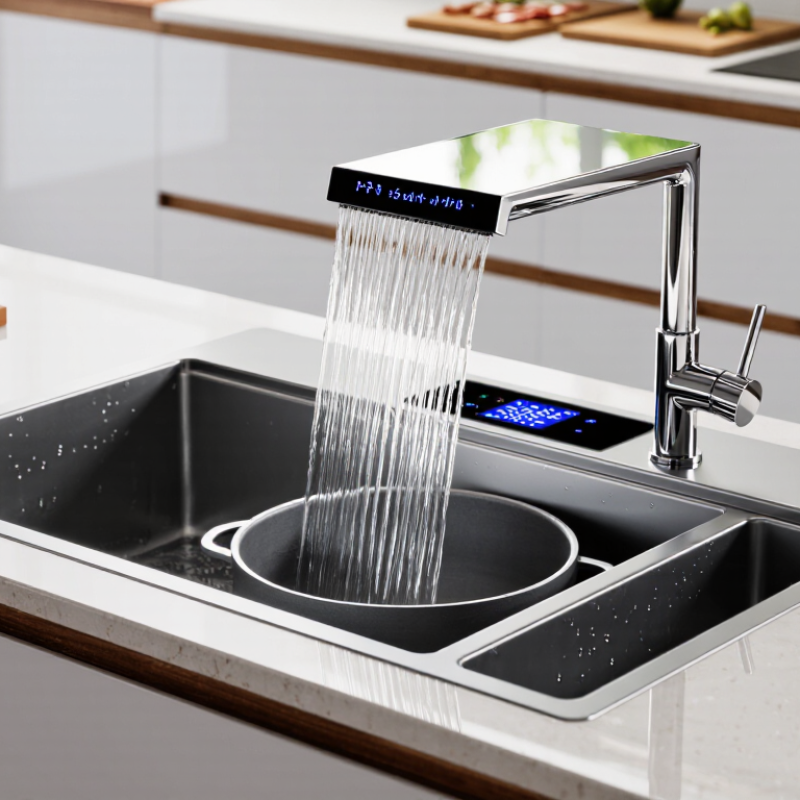
A digital display waterfall sink combines a basin, a wide outlet, control buttons, and a temperature or flow display. The display may show water temperature, while touch or sensor controls adjust the stream. Features vary by model, so check the product instructions before assuming what each icon means. A broad, even sheet of water looks striking, but it can splash if the outlet sits too high above the basin.
Inside the unit, a mixing valve blends hot and cold supplies before water reaches the spout. Flexible hoses connect the faucet to the supply lines, while an electronic module powers the display and controls. Some designs use batteries; others require a suitable electrical connection. Keep wiring and connectors dry, and have installation checked if the instructions or fittings are unclear. Small details matter. I’ve found that a slightly loose hose can be easy to overlook until a cabinet floor feels damp.
Tips: Before installation, confirm the sink cutout, water connections, and power requirements. Run the faucet briefly and inspect every joint for leaks. Wipe the display with a soft cloth, not an abrasive pad. If readings seem inconsistent, check the manual and verify the water temperature with a separate thermometer; displays can differ slightly. Don’t guess.
A digital display integrated waterfall sink needs more than a stylish cutout. Tip 1: Measure the countertop opening against the sink’s installation template, not just its overall dimensions. Leave room for the rim, clips, and any control panel. Tip 2: Check the counter material and thickness with the installer. A heavy sink can need extra support, and a narrow cabinet may limit access below. Measure twice.
Tip 3: Trace the plumbing before ordering. Confirm the drain position, trap clearance, hot- and cold-water connections, and available water pressure. A waterfall outlet may behave differently from a standard faucet, so follow the sink’s specifications. Tip 4: Open and close the cabinet doors with the proposed sink in place—or mark its footprint with tape. It is easy to overlook a drawer that hits a pipe.
Tip 5: Treat the display’s power needs as a separate installation check. Confirm the required voltage, cable route, and outlet location in the product instructions. Keep connections away from splashes, and ask a qualified electrician to assess the setup and applicable local requirements. Don’t improvise with extension cords under the sink. One detail people sometimes miss: leave enough access to unplug or service the unit later. That can be awkward after the countertop is fitted, and it deserves a second look.
Place the digital display where it remains easy to read while you stand at the sink. Before switching on the unit, check the installation guide for its power requirements and connection points. Keep plugs and connections away from splashes. If the display uses batteries, fit the specified type and confirm the contacts are seated correctly. A loose connection can make readings flicker. Not ideal.
Turn on the display and check that its temperature reading responds when water runs. Some models show temperature only after flow begins, so give the screen a moment. Use the waterfall control gently, then adjust the flow and temperature in small steps. Watch the stream as well as the numbers; a display is useful, but it may not match a separate thermometer exactly. Test with cool water first, then increase the temperature gradually. Wipe the screen with a soft, damp cloth, and avoid pressing controls with wet, soapy fingers if the guide warns against it. One small frustration: bright kitchen lighting can make the screen harder to read, so check its visibility at different times of day.
A waterfall sink can rinse leafy greens quickly, but a broad stream may splash when it hits a shallow bowl. Keep the produce near the basin floor and use a moderate flow. For filling a pot, position it beneath the outlet before turning on the water. Small changes matter. If the digital display shows flow rate or temperature, use it to avoid running water while adjusting the handle. The display is helpful, but it cannot replace attention to splash and drainage.
The Water Research Foundation’s Residential End Uses of Water, Version 2 (2016), estimated kitchen-faucet use at about 1.7 gallons per person per day in the study homes. That figure covers typical use, not every household or waterfall fixture. Still, it shows why short, task-focused rinses are worthwhile.
Turn off the flow while scrubbing a pan, then use a brief rinse to clear soap and food residue. A waterfall sheet can make this step feel faster, yet it may use more water if left running. Check the drain screen, too; scraps can slow drainage and leave water pooling around dishes. The visual stream is attractive, but sometimes a narrower flow is simply more practical.
Keep the display and sensor area clean with a soft, slightly damp microfiber cloth. Before wiping, check the sink’s care instructions and switch off its power if the manual recommends it. Never spray cleaner directly onto the display or sensor; liquid can seep into seams. A little mild dish soap on the cloth is usually enough for fingerprints and splashes. Wipe gently, then dry the surface with a clean cloth. Small steps matter.
Waterfall channels can collect mineral spots, especially where droplets dry along the edge. Wipe them after use, and use a soft cloth with diluted, sink-safe cleaner for stubborn marks. Avoid scouring pads, abrasive powders, and strong acids, which may scratch or dull the finish. Don’t scrape deposits with a knife. That sounds obvious, yet a rushed cleanup can leave marks. If the sensor responds inconsistently, clean and dry its window first, then check for blocked water flow or nearby objects. Follow the manufacturer’s troubleshooting guidance rather than opening electronic components. I sometimes miss a splash beneath the display; it is worth checking that narrow seam during routine cleaning.
Cleaning and Maintaining the Sink’s Sensors and Surfaces
Suggested routine for a regularly used kitchen: wipe the display, sensor areas, and sink surfaces daily; clean the aerator and perform a more thorough sink clean weekly. Use a soft, damp cloth around electronics, avoid abrasive cleaners, and follow the sink’s care instructions.
Keep it easy to read while standing at the sink. Check its visibility in bright kitchen light, too.
Some displays show a reading only after water starts flowing. Check the specified batteries and connections if the screen flickers. Not always exact.
Start with cool water, then make small adjustments. Watch the stream as well as the display, since its reading may differ from a separate thermometer.
Keep the produce near the basin floor and use moderate flow. A broad stream can splash against a shallow bowl.
Place a pot under the outlet before turning on the water. Turn off the flow while scrubbing, then rinse briefly. Small changes matter.
One study estimated about 1.7 gallons per person daily in its homes. That figure may not reflect every household or waterfall fixture.
Use a soft, slightly damp microfiber cloth, then dry the surface. Avoid spraying cleaner directly onto the display or sensor.
Clean and dry its window first. Check for blocked flow or nearby objects, then follow the care guide. Don’t open electronic parts.
A Digital Display Integrated Waterfall Kitchen Sink combines a wide, smooth water outlet with a digital control panel and built-in features designed to make everyday kitchen tasks easier. Before installation, check that the countertop can accommodate the sink, the plumbing connections are compatible, and a suitable power source is available for the display and electronic controls. Understanding how the basin, faucet, sensors, and controls work together can help you set up the sink safely and use its functions with confidence.
Once installed, learn how to adjust the display and waterfall flow to suit tasks such as rinsing produce or washing dishes, and turn the water off when it is not needed to avoid waste. Regular care helps keep the sink working well: clean the display and sensor areas gently, remove residue from the basin and outlet, and follow the care guidance provided with the product. A thoughtful setup and simple maintenance routine can support convenient, efficient use over time.